Video in WordPress sounds simple until your files get bigger, your library gets crowded, and your hosting bill starts carrying the weight. I’ve seen how quickly it becomes a bottleneck once you start publishing at scale.
For many site owners, what begins as a straightforward upload process quickly turns into a constant battle with storage limits, upload timeouts, bandwidth usage, playback performance, and messy video management. That is exactly why I built Stream Integration Pro, a premium Cloudflare Stream WordPress plugin designed for modern WordPress workflows.
Stream Integration Pro helps you use Cloudflare Stream in WordPress in a way that feels native, practical, and production-ready. Whether you run a membership site, online course platform, publisher, agency, or content-heavy business, it gives you a better way to offload WordPress videos and manage them with far more control.

Video Hosting in WordPress Gets Hard Fast
WordPress is excellent at managing content, but video creates a different kind of operational burden.
As video files grow, so do the problems around them. Large uploads can fail because of server limits or PHP timeouts. Media libraries become harder to manage. Local storage fills up faster than expected. Bandwidth usage increases. Playback delivery becomes a performance issue instead of a simple media task. And once a site starts publishing video regularly, those small pain points turn into real workflow friction.
This is especially true for teams managing a lot of content. If you are working with lessons, webinars, premium media, product videos, tutorials, interviews, or editorial content, native WordPress video hosting can become expensive, inefficient, and difficult to scale.
That is where a dedicated WordPress video hosting workflow becomes necessary.
Why Cloudflare Stream Is a Smart Solution
Cloudflare Stream is a strong fit for WordPress users who want a better way to handle video delivery without building a custom system around it.
Instead of relying fully on your WordPress server for storage and playback, Cloudflare Stream is built to handle the heavy lifting around video processing and delivery. That reduces the operational burden on your site and gives you a more scalable path for publishing video content.
For WordPress users, this matters for a few practical reasons.
First, it helps reduce pressure on your own hosting environment. You are no longer trying to make your web server act like a dedicated video platform.
Second, it improves delivery. Video playback is one of the most bandwidth-intensive parts of many websites, and moving that responsibility to a purpose-built service can make a meaningful difference.
Third, it creates a cleaner path for scaling. If your site is growing, or you already manage lots of media, using Cloudflare Stream for WordPress is often much more sustainable than keeping everything local.
In other words, it is not just about hosting a few MP4 files. It is about improving video delivery for WordPress in a way that is easier to manage long term.
A Cloudflare Stream WordPress Plugin Built for Real Workflows
There have been options in this space before, which is helpful because it shows the need is real. But many serious WordPress users need something more complete, more current, and better aligned with how sites are actually managed today.
Stream Integration Pro was built with that in mind.
It is actively maintained, designed for modern WordPress workflows, and focused on solving real production use cases instead of just covering the basics. Rather than treating Cloudflare Stream as a disconnected external service, the plugin brings it into familiar WordPress interfaces so site owners and teams can work more naturally.
That includes stronger WordPress media library Cloudflare Stream workflows, support for direct uploads, reverse sync, WP-CLI, multisite, and flexible hybrid storage options depending on how you want your media stack to work.
The goal is simple: give WordPress users better operational control without adding more complexity to their workflow.
What Stream Integration Pro Helps You Do
Stream Integration Pro is not just a connector. It acts as a full workflow layer between WordPress and Cloudflare Stream.
You can upload videos from the WordPress Media Library to Cloudflare Stream when you want to offload existing assets. This is especially useful for sites that already have a local library and want to reduce storage or delivery pressure over time.
You can also send videos directly to Cloudflare Stream, which helps avoid the pain that often comes with large video uploads in WordPress. Instead of forcing every file through a purely local workflow, you can move toward a more efficient publishing process from the start.
If you already use Cloudflare Stream outside WordPress, Stream Integration Pro can import your existing videos into WordPress so your content library stays organized and visible where your team already works.
And when needed, you are not locked into a single storage model. You can restore or download local copies, keep both local and Stream versions, work in a stream-only mode, or choose a local-first workflow. That flexibility matters because not every site has the same operational needs.
Built for Better Media Management
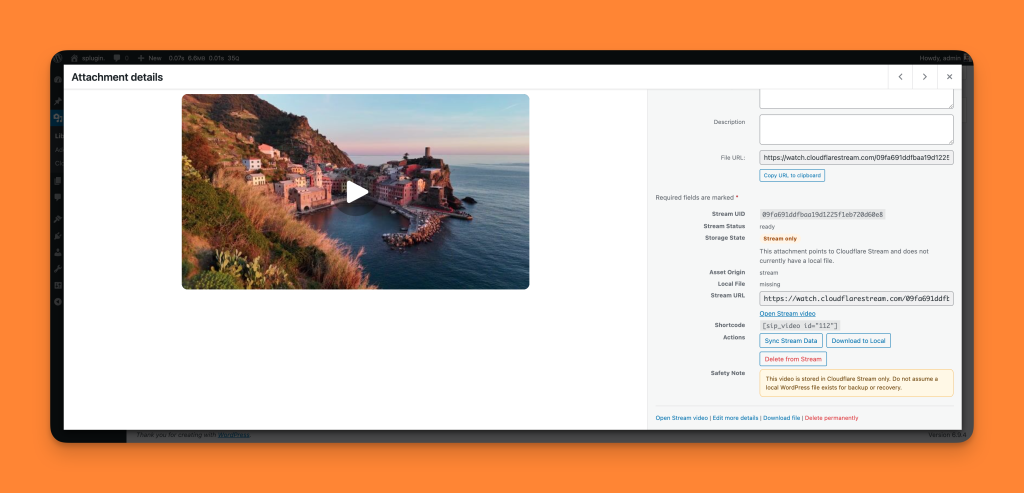
One of the biggest frustrations with many video tools is that they feel bolted on rather than built in. Stream Integration Pro is designed to feel like part of WordPress.
It includes Media Library actions and filters that make it easier to manage video content at scale. That means less switching between systems and more visibility inside the dashboard your team already knows.
It also supports both the block editor and classic editor, so you are not forced into a new editing model just to use the plugin. Whether your site is fully modernized or still relies on older editorial workflows, the plugin fits into the environment you already have.
For teams that publish frequently, this kind of workflow polish matters just as much as raw feature count.
More Control for Production Use Cases
Many WordPress video plugins focus on the basic connection layer. Stream Integration Pro goes further by giving site owners and teams the control they need for real operational use.
WP-CLI support makes it easier to handle bulk tasks, automation, and developer workflows. That is a major advantage for agencies and advanced site owners who want to manage media more efficiently.
Multisite support is also built in, which is important for organizations managing multiple sites under one WordPress network.
The plugin also supports local-plus-stream, stream-only, and local-first workflows. That means you can shape the media pipeline around your business model instead of forcing your business into a rigid media workflow.
For teams that need to offload WordPress videos while keeping editorial and operational flexibility, this is a much better fit than a one-size-fits-all tool.
Who Stream Integration Pro Is For
Stream Integration Pro is built for WordPress users who have already felt the pain of video at scale.
It is a strong fit for site owners who publish educational or premium video content and need a more reliable WordPress video plugin workflow.
It is valuable for membership and course businesses that want smoother handling of lessons, training videos, and gated content.
It is useful for publishers and media teams that manage lots of video assets and want better organization inside WordPress.
It is also a practical option for agencies supporting client sites where storage usage, bandwidth costs, and upload reliability can quickly become support issues.
And for anyone tired of clunky video workflows, failed uploads, and oversized media libraries, it offers a cleaner path forward.
Built for Teams That Need More Than a Basic Integration
Cloudflare’s official Cloudflare Stream Video plugin helped establish the foundation for using Cloudflare Stream with WordPress. At the same time, its WordPress.org listing shows it was last updated 4 years ago and notes that it may no longer be maintained or supported.
The current plugin also appears focused primarily on block editor usage, with a narrower feature set than many production WordPress sites need today. Based on the listing and user feedback, areas like broader Media Library workflows, classic editor support, and more flexible operational tooling remain limited.
Stream Integration Pro is built to serve those broader needs.
It brings Cloudflare Stream into native WordPress workflows more completely, with support for direct uploads, Media Library actions and filters, reverse sync, local restore options, WP-CLI, multisite support, and flexible hybrid workflows for teams managing video seriously inside WordPress.
The result is a more complete solution for site owners who want to use Cloudflare Stream in WordPress in a practical, scalable way.
Why This Matters for Growing WordPress Sites
When video becomes central to your content strategy, the problem is no longer just embedding a player. It becomes a question of how you will manage storage, bandwidth, uploads, playback, workflow, and scale over time.
That is why many teams eventually look to WordPress video hosting alternatives and explore ways to offload WordPress videos from their primary server environment.
Cloudflare Stream reduces much of that operational burden. Stream Integration Pro brings that value into native WordPress workflows so site owners do not have to choose between a better video stack and a manageable editorial process.
You get the benefits of Cloudflare Stream with the usability of WordPress.
Stream Integration Pro Is Available Now
If your site is struggling with large uploads, media bloat, bandwidth pressure, or fragmented video workflows, Stream Integration Pro was built for exactly that problem.
It gives you a practical way to use Cloudflare Stream inside WordPress with better Media Library integration, direct uploads, reverse sync, flexible storage workflows, block and classic editor support, WP-CLI, multisite support, and more.
If you have been looking for a Cloudflare Stream WordPress plugin that feels actively maintained, complete, and ready for real-world use, Stream Integration Pro is here.
Explore Stream Integration Pro and see how much easier video management in WordPress can be when the workflow is built for modern publishing.