This guide explains how Stream Integration Pro behaves in WordPress multisite.
Supported Multisite Modes #
The plugin supports:
- site-level activation on a single subsite
- network activation across the whole multisite network
Network-Activated Mode #
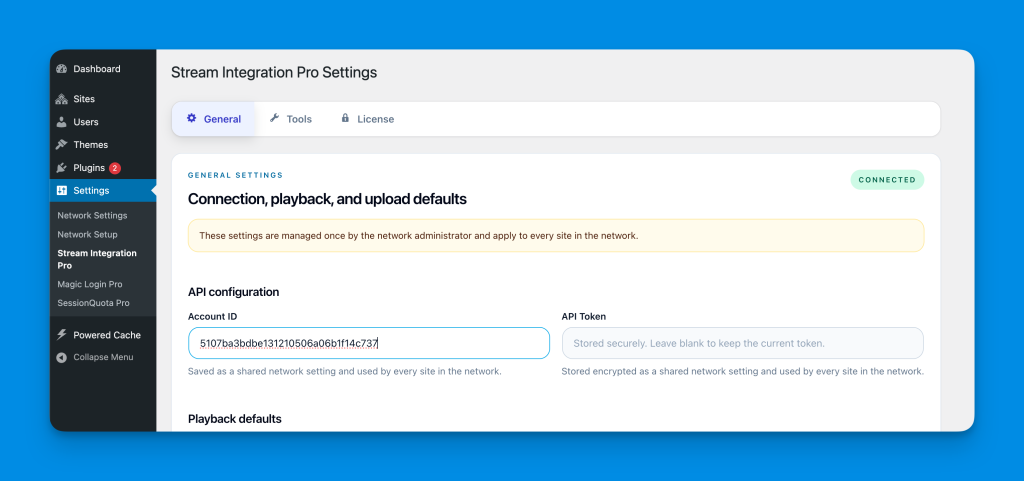
When Stream Integration Pro is network-activated:
- shared plugin settings are managed in
Network Admin > Settings > Stream Integration Pro - Cloudflare credentials are managed once for the network
- the license is managed once for the network
- update checks use the network activation context
At the same time:
- each subsite keeps its own Media Library
- each subsite keeps its own attachments
- site users still use Stream workflows inside their own site
What Site Users Can Still Do #
Even in network-activated mode, site-level users can still:
- upload videos to the Media Library
- auto-import local videos to Stream
- use Stream videos in blocks and shortcodes
- import videos from the Stream library
- restore local copies
- manage their own site’s attachment-level actions
The network admin owns the global account configuration, but day-to-day media work stays site-specific.
What Moves to the Network Admin #
These become network-managed when Stream Integration Pro is network-activated:
- plugin settings
- Cloudflare credentials
- license data
- updater configuration
Storage Scope Rules #
Shared across the network #
- credentials
- playback defaults
- storage defaults
- licensing and update metadata
Still site-specific #
- Media Library attachments
- attachment status and metadata
- local file existence
- queue jobs for that site’s attachments
- cleanup actions for that site’s library
Recommended Multisite Model #
The best mental model is:
- the network admin owns the Stream account connection
- each subsite uses Stream as part of its own Media Library workflow
This is closest to how shared remote storage usually behaves in multisite.
Important Note About Permissions #
The plugin is designed so that:
- network admins manage shared configuration
- site-level users manage site-level media workflows
If you want to further restrict Stream library access in a multisite network, plan that policy before rollout and test it with your real editorial roles.