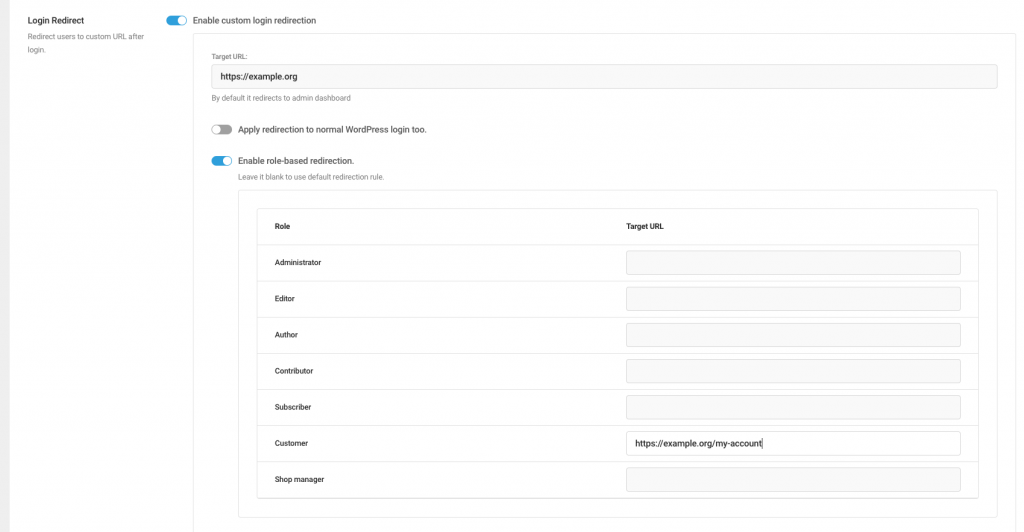
Another handy feature of the Magic Login Pro is that, login redirect. You can easily specify a target URL right after the login process has completed.
Role Based Redirection #
You can also apply target redirection URL based on the user’ role. If you leave a target URL blank for a particular role, the default redirection URL will be applied.
Add redirection to normal logins too #
Applying redirection rules to regular WordPress logins is easy like turning on the toggle.
Troubleshooting #
Magic Login relies on wp_safe_redirect for security. When you’re working on a staging site, any redirect pointing to a different domain may be blocked by WordPress. If the target domain isn’t allowed, the redirect will fall back to the WordPress admin dashboard.
To allow redirects to an external domain, add the domain to the list of permitted hosts using the snippet below:
add_filter( 'allowed_redirect_hosts', function( $hosts ) {
    $hosts[] = 'example.com';
    return $hosts;
} );