Blocked login recovery helps legitimate users regain access when Block new login mode prevents a new sign-in.
How it works #
When a user hits the session limit in Block new login mode:
- The new login is blocked
- The user can request a one-time recovery email
- The email contains a temporary link
- The user follows the link to log out other active sessions
- The user can try signing in again
When to use it #
Enable this feature if:
- You want to reduce support tickets
- Your users often switch between devices
- You use strict login blocking but still want a self-service recovery path
Where to configure it #
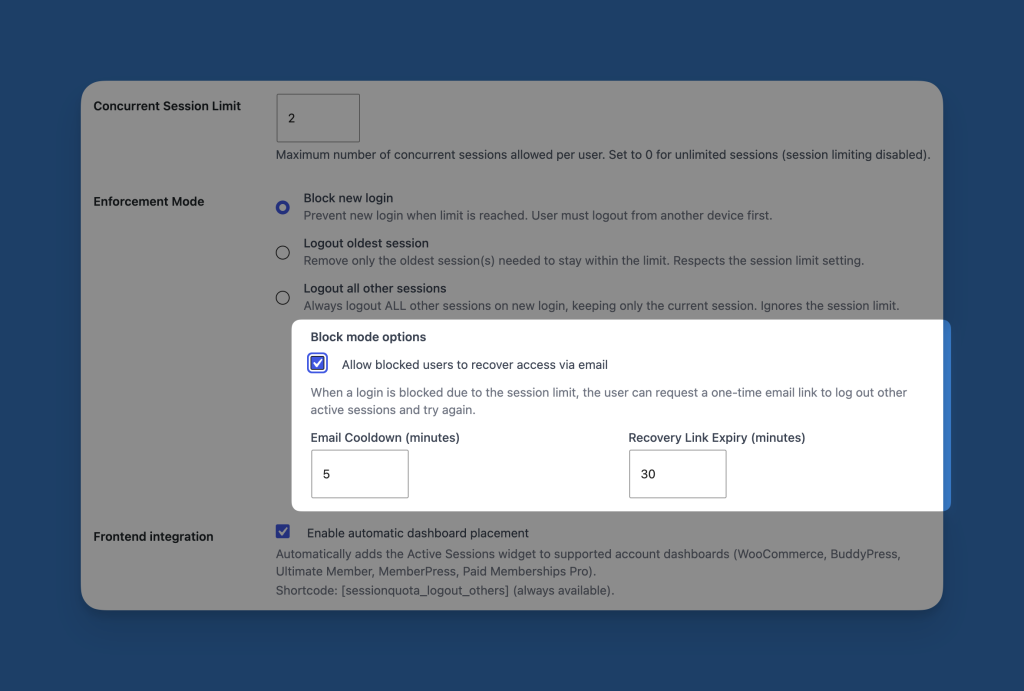
Go to the General tab and select Block new login.
You can then enable block mode option:
Allow blocked users to recover access via emailEmail CooldownRecovery Link Expiry
Recommended settings #
For most sites, a good starting point is:
- Email cooldown:
5minutes - Recovery link expiry:
30minutes
Important notes #
- This feature is only relevant when
Block new loginis the active enforcement mode - If another mode is active, blocked login recovery is not used
- Short cooldown values can increase email volume
- Long expiry times can make recovery links less secure
Best practices #
- Use a clear email sender identity on your site
- Test the full recovery flow after setup
- Make sure your WordPress email delivery is reliable
- Keep the cooldown long enough to discourage repeated abuse