Skip to content

HandyPlugins

  • Home
  • PluginsExpand
    • Magic Login Pro
    • WP Accessibility Toolkit
    • PaddlePress Pro
    • Easy Text-to-Speech
    • Handywriter
    • SessionQuota Pro
  • Docs
  • About
  • Blog
  • Contact
My Account
HandyPlugins
Popular Search shortcodehookemailtheredirect

Magic Login Pro

40
  • Installation & Configuration
  • Use magic login as the default login method?
  • Brute Force Protection
  • WooCommerce Integration
  • Easy Digital Downloads (EDD) Integration
  • Token Lifespan
  • Disable Magic Login for a Specific User
  • Login with Code: Flexible Passcode-Based Authentication
  • SMS Login – Passwordless Authentication with SMS
  • Magic Login REST API
  • QR Code Login
  • CLI Command
  • Add Login form to a Page
  • Reset Tokens
  • Auto Login Links
  • Token Validity
  • Login Redirect
  • Shortcode
  • Login Email Customization
  • Login Request Throttling
  • IP Check
  • Domain Restriction
  • Registration
  • Spam Protection
  • How to Add Magic Login to Any of Outgoing Emails?
  • Customize Default Messages
  • nG Firewall
  • Dynamically Adjust Token TTL
  • How to change Sender Details?
  • Disable Magic Login for specific roles
  • Customizing Login Session Duration
  • Magic Login Twilio Integration
  • Magic Login – FluentCRM Integration
  • Reset Magic Login Links for a User
  • Tools – Reset, Export & Import Magic Login Settings
  • Magic Login Elementor
  • Magic Login – Security Guide
  • Per-User Login Email Limit
  • Two-Factor Authentication (2FA) Compatibility Guide
  • Hooks

PaddlePress Pro

27
  • Installation & Configuration
  • How does PaddlePress PRO work?
  • Automatic account creation
  • How to set up a membership website?
  • Setup a Development Environment
  • Protect Download Files on NGINX
  • Software Licensing
  • Software Licensing API
  • Updater Implementation for WordPress Plugins
  • Updater Implementation for WordPress Themes
  • Release a New WordPress Product
  • Customer Dashboard (My Account) Page
  • Checkout Buttons
  • Custom Redirect After Successful Checkout
  • How does the domain count?
  • Emails
  • Accessing Readme through a Shortcode
  • How to Sell WordPress Products?
  • Releasing Beta Versions of a WordPress Product
  • Paddle Billing
  • Customer Dashboard
  • Membership Levels
  • Restrict Content
  • Add a Custom Payment Action
  • How to customize “Download” Button?
  • Adding Manual Payments
  • Composer Support for Private WordPress Packages

Handywriter

11
  • Installation & Configuration
  • Write a Blog Post
  • Create a Summary
  • Suggest a Title
  • Keep records of AI generated Contents
  • Grammar & Spelling Fixer
  • Plagiarism Check
  • Content Templates
  • How to create a Meta Description?
  • How to complete a sentence?
  • How does credit calculation work?

Easy Text-to-Speech

5
  • Installation & Configuration
  • Using with Block Editor
  • Using with Classic Editor
  • OpenAI Integration
  • ElevenLabs Integration

WP Accessibility Toolkit

3
  • Customization
  • Hotkeys: Quick Navigation and Efficiency
  • Do not show the accessibility toolkit on the specific page

Stream Integration Pro

6
  • Getting Started
  • Media Library Workflows
  • License and Updates
  • Troubleshooting
  • Tools and Cleanup
  • Multisite Guide

SessionQuota Pro

12
  • Quick Start
  • Installation and Activation
  • Settings Overview
  • Enforcement Modes
  • Limits and Priority
  • Frontend Session Management
  • Blocked Login Recovery
  • Admin Tools
  • Monitoring and Alerts
  • Multisite Guide
  • WP-CLI Guide
  • Troubleshooting

FAQ

1
  • How to Enter Your VAT Number for VAT Deduction at Checkout
  • Home
  • Docs
  • Stream Integration Pro
  • Multisite Guide
View Categories

Multisite Guide

This guide explains how Stream Integration Pro behaves in WordPress multisite.

Supported Multisite Modes #

The plugin supports:

  • site-level activation on a single subsite
  • network activation across the whole multisite network

Network-Activated Mode #
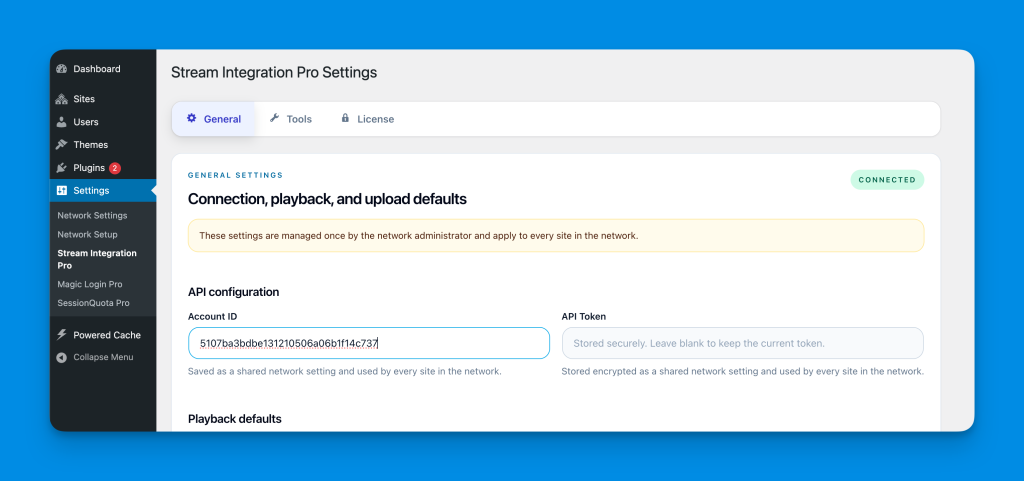
When Stream Integration Pro is network-activated:

  • shared plugin settings are managed in Network Admin > Settings > Stream Integration Pro
  • Cloudflare credentials are managed once for the network
  • the license is managed once for the network
  • update checks use the network activation context

At the same time:

  • each subsite keeps its own Media Library
  • each subsite keeps its own attachments
  • site users still use Stream workflows inside their own site

What Site Users Can Still Do #

Even in network-activated mode, site-level users can still:

  • upload videos to the Media Library
  • auto-import local videos to Stream
  • use Stream videos in blocks and shortcodes
  • import videos from the Stream library
  • restore local copies
  • manage their own site’s attachment-level actions

The network admin owns the global account configuration, but day-to-day media work stays site-specific.

What Moves to the Network Admin #

These become network-managed when Stream Integration Pro is network-activated:

  • plugin settings
  • Cloudflare credentials
  • license data
  • updater configuration

Storage Scope Rules #

Shared across the network #

  • credentials
  • playback defaults
  • storage defaults
  • licensing and update metadata

Still site-specific #

  • Media Library attachments
  • attachment status and metadata
  • local file existence
  • queue jobs for that site’s attachments
  • cleanup actions for that site’s library

Recommended Multisite Model #

The best mental model is:

  • the network admin owns the Stream account connection
  • each subsite uses Stream as part of its own Media Library workflow

This is closest to how shared remote storage usually behaves in multisite.

Important Note About Permissions #

The plugin is designed so that:

  • network admins manage shared configuration
  • site-level users manage site-level media workflows

If you want to further restrict Stream library access in a multisite network, plan that policy before rollout and test it with your real editorial roles.

Was this guide helpful for you?
Updated on April 13, 2026
Tools and CleanupGetting Started
Table of Contents
  • Supported Multisite Modes
  • Network-Activated Mode
  • What Site Users Can Still Do
  • What Moves to the Network Admin
  • Storage Scope Rules
    • Shared across the network
    • Still site-specific
  • Recommended Multisite Model
  • Important Note About Permissions

HandyPlugins

Explore

Home
Blog
Contact Us
My Account

Products

Magic Login Pro
Handywriter
Easy Text-to-Speech
PaddlePress Pro
WP Accessibility Toolkit

Follow Us

Twitter
Facebook
GitHub
WordPress

2026 – HandyPlugins.co | Hosted on WPHandle and optimized with Powered Cache

  • Terms and Conditions
  • Privacy Policy
  • Cookie Policy
  • Home
  • Plugins
    • Magic Login Pro
    • WP Accessibility Toolkit
    • PaddlePress Pro
    • Easy Text-to-Speech
    • Handywriter
    • SessionQuota Pro
  • Docs
  • About
  • Blog
  • Contact
We use cookies to ensure that we give you the best experience on our website. If you continue to use this site we will assume that you are happy with it.